Tools
The in-game editor
Operators (permission level 2) see a Dev Mode button in the Adventure Menu. It opens an editor that works like the edit mode of FTB Quests and writes the files in the story folder for you.
The map
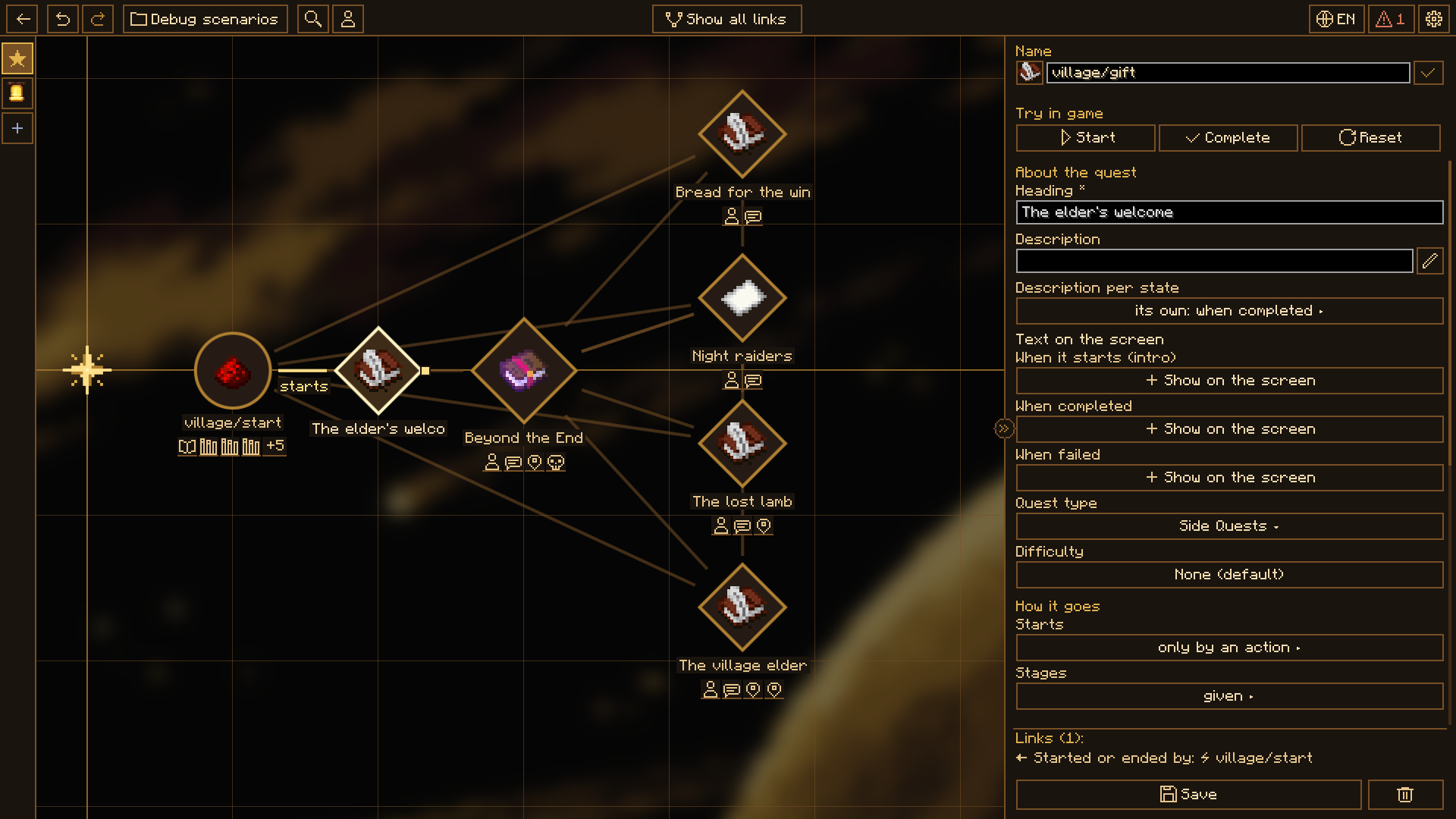
The map shows the story's quests and story events. An arrow goes from each one to what it leads to, labelled in plain words: "after it is completed", "starts", or "through 💬" when a dialogue or a script sits in between.
Things that belong to a quest, such as the NPC who gives it, its dialogues, documents, waypoints and boss, are shown as a row of badges under it. Click a badge to edit it, and double-click a dialogue badge to open its graph. ⚡ marks a quest that starts by its own trigger, and a red dot marks a problem.
Hover over a node to highlight its links and dim everything else. Drag from a node's port onto another node to make the second one follow the first.
Chapters
The strip of icons on the left lists the chapters, as in FTB Quests. ★ is the whole story, then comes each chapter (shown by its icon or its first letter), ◌ holds what is in no chapter, and + makes a new chapter. Hover over an icon to see its name.
The top bar
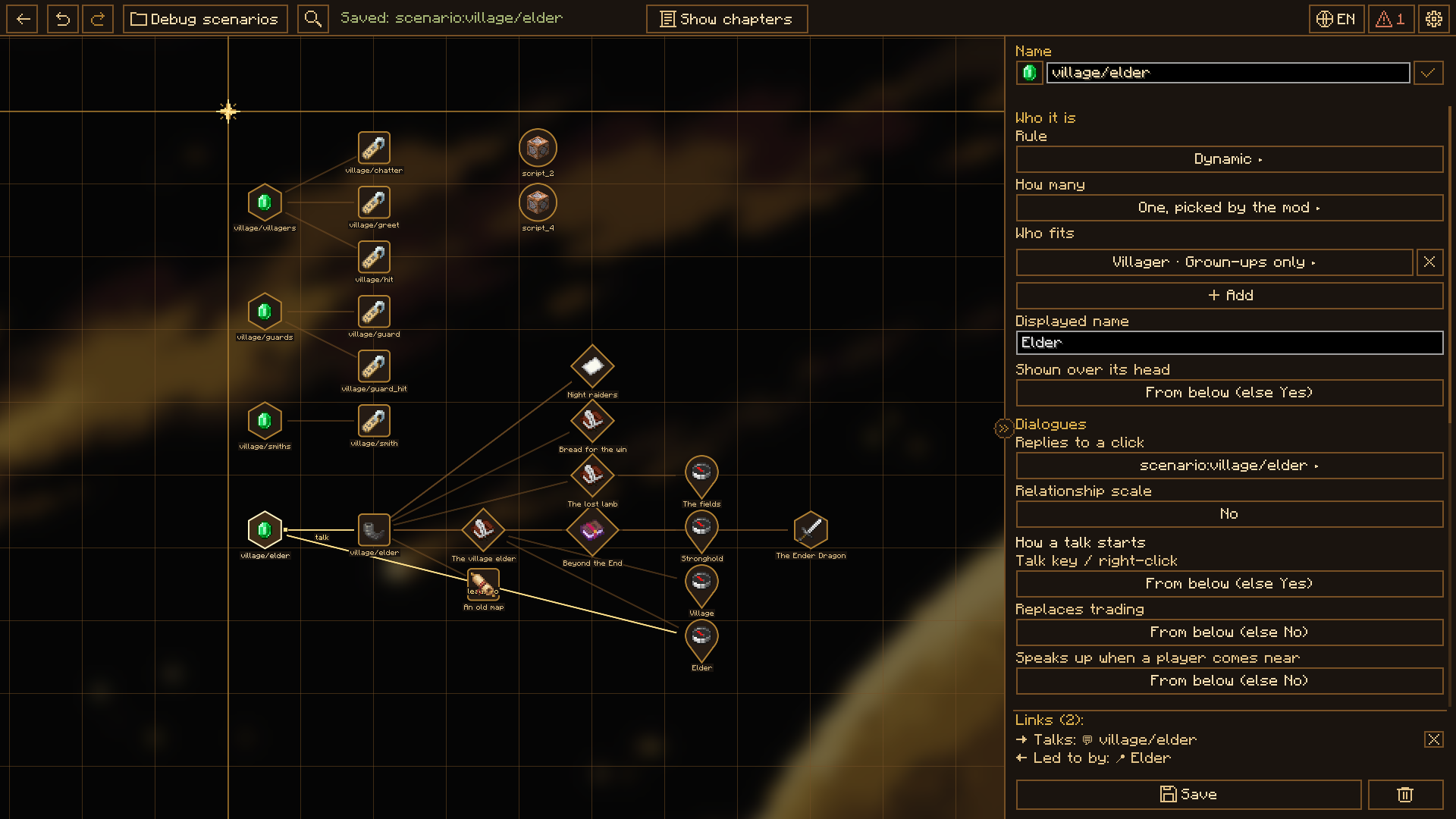
The top bar uses small icons, and hovering over one shows what it does:
- ← goes back, and ↶ ↷ undo and redo;
- 🌐 is the language you are writing in;
- ⚙ opens the story's settings, languages and namespace;
- in the middle, "Show all links" shows every definition as a card with all its links, across the whole width, and "Show chapters" goes back;
- on the right, 👤 shows a player's progress on the map (quests they don't know yet are dimmed, the others are marked as done, at a stage or failed), 🔍 opens search (Ctrl+F), and ⚠ lists the problems.
Stories
The stories list shows every story in the story folder. You can create a story, rename it, turn it on or off, and
delete it. A deleted story is moved to config/storybound/.deleted/, so nothing is lost. The story that comes with
the mod shows as ⬇ Install until you copy it in; its switch is the world's storyboundStory game rule.
Search and problems
Search finds any definition by its title or id, and marks the ones that nothing uses as "unused". Click a result to go to it. Right-click a quest or a story event and pick "On the map" to put it in the open chapter. "+ New" makes a definition of any kind.
The problems list shows what the validator found. Click a problem to go to its node.
The inspector
The panel on the right is a form for the selected definition, built from the JSON schemas. It shows every field and the "when, if, then" lists with every type, including types added by other mods. Pickers help you choose items, mobs, structures, biomes, quests, dialogues and more.
Position fields have 📍 (where you are standing) and 🎯 (click a place in the world). Uuid fields have 🎯 (click an entity).
Quick tests let you try a definition right away: start or complete a quest, start a dialogue, give yourself a document, teleport to a waypoint, or run a script.
Other parts of the editor
- Long texts, such as documents, Codex sections and boss lore and tactics, open in a text window with the markup at hand. A document can be previewed on its real reading screen before you save it.
- Relationships and schedules: "❤ Relationship scale" on an NPC creates a number for each player
(
<namespace>:rep/<npc>). After that, adding an action offers "+10 / -10", and adding a condition offers "at least 20 / at most -20". Conditions also offer "by day / in the evening / at night" for an NPC's schedule. - Double-click a quest to look inside it: what starts it, a column for each stage with its objectives and everything the stage touches (dialogues, documents, waypoints, scripts, NPC lines, story events), and what follows. Click anything to go to it.
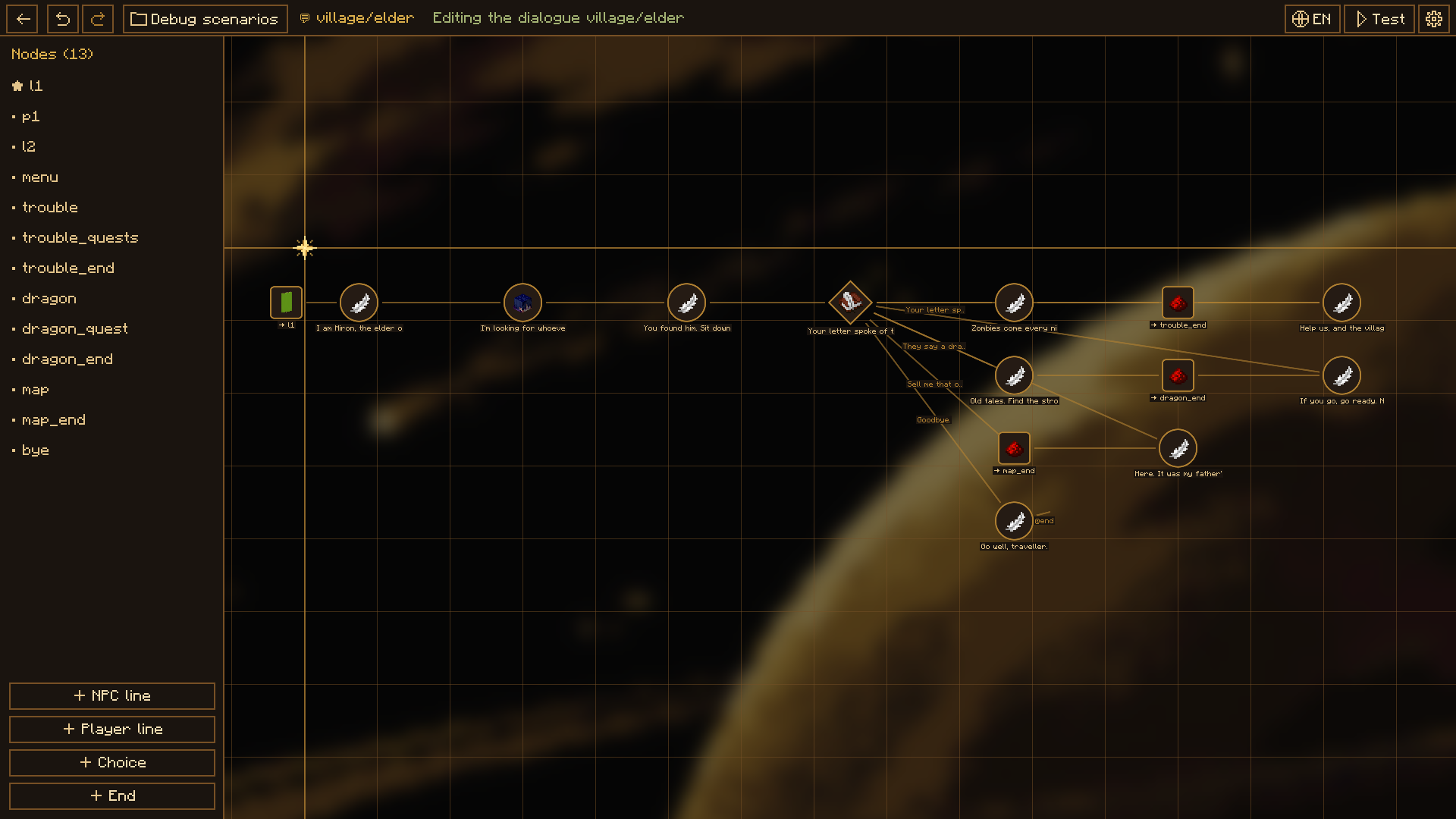
- Dialogues open as graphs of their own.
- A quest that an NPC gives shows the NPC's dialogues before, during and after the quest, with "+ New" to write a missing one.
- Scripts of vanilla commands are nodes of their own (see Scripts in the editor). Where KubeJS is installed, every KubeJS handler your scripts register also shows as a block, with arrows to what runs it and what it leads to, and "New file" writes a script from a template.
- Texts are written in the language you are editing, with the source language shown next to them.
When you save, the definition is checked first. If it is invalid, the save is refused and you are told why. Otherwise
the file is written the way you wrote it: your field order and formatting are kept, and files you didn't touch are
left alone. You don't need to run /reload.
Commands
All commands need permission level 2, except party.
/storybound flag get|clear <players> <key> [scope]
/storybound flag set <players> <key> <true|false> [scope]
/storybound var get|clear <players> <key> [scope]
/storybound var set <players> <key> <value> [scope]
/storybound var add <players> <key> <amount> [scope]
/storybound debug trigger fire <id> <players>
/storybound document give <players> <document> [count]
/storybound document open|mark_read <players> <document>
/storybound quest state <players> <quest> <unknown|active|completed|failed>
/storybound quest stage <players> <quest> <stage>
/storybound quest reset <players> <quest>
/storybound quest track <players> [quest]
/storybound quest list <player>
/storybound dialogue start <players> <dialogue> [speaker]
/storybound dialogue stop <players>
/storybound debug npc <entity> [unbind]
/storybound debug npc parts
/storybound debug npc part <npc> reset
/storybound codex unlock|lock <players> <entry> [section]
/storybound codex list <player>
/storybound boss unlock <players> <boss> <lore|tactics|rewards>
/storybound boss reset <players> <boss>
/storybound boss info <player> <boss>
/storybound waypoint add <id> <pos> <name> | remove <id> | list <player>
/storybound party create [name]|invite <player>|accept|decline|leave|kick <player>|disband|info
/storybound debug validate
/storybound debug trace on [players] | off | status
/storybound debug [player] | off
/storybound debug scenario <name> | clear
/storybound story install <id> [replace]
/storybound debug dump <player>
/storybound debug export
/storybound debug lang extract [language] | preview [language]
These commands also work from command blocks, datapack functions and the NPC actions of other mods, so a story doesn't need scripts to drive it.
Finding out why something did not happen
/storybound debug trace on [players] writes everything the story does to logs/storybound-trace.log, one JSON
object per line. It records which trigger fired, which condition failed and why ("flag mypack:gate is unset, wanted
true", "has 2, wanted 5"), which action ran or failed, changes to quests and objectives, dialogues starting and
ending, and why an NPC didn't talk. /storybound debug trace off stops it.
/storybound debug [player] shows a player's story live, in a panel on your screen: the dialogue and node they are at,
their active quests with stages and counts, and the last things the story did for them, such as which trigger fired,
which condition failed and why, and which action ran. /storybound debug off hides the panel.
Two commands write files you can read instead of watching the game:
/storybound debug dump <player>writeslogs/storybound-dump-<player>.json: the player's flags in every scope, their quests with stages and counters, pinned quests, Codex, bosses, Journal and the dialogue in progress./storybound debug exportwriteslogs/storybound-export.json: every name a story can use. That includes all condition, action and trigger types (also those added by other mods), the script handlers, every definition id, quests with their stages and objectives, dialogue nodes, Codex sections, and both declared and undeclared flags.
Checking the story
Every time the data loads, Storybound checks the story. It reports files that don't parse, quests, stages, dialogues, documents, Codex entries and bosses that are named somewhere but don't exist, problems in dialogue graphs (nodes that can't be reached, links to missing nodes), problems in quest structure, undeclared flags, script handlers that nothing registers, and more.
The report goes to the log and to logs/storybound-validation.txt and logs/storybound-validation.json, where each
problem comes with its file and, when known, the missing field. Operators get a line in chat when they join while
there are errors. /storybound debug validate runs the check again.
In your language
/storybound_client validate, run on a client, lists every translation missing in the language the game is set to,
texts still written directly in the JSON, long texts that only exist in English, and document styles that no resource
pack provides. The list is written to logs/storybound-client-validation.txt.
Without playing, for CI
Start the modpack's server with -Dstorybound.validate. It loads the story together with every mod of the pack,
writes logs/storybound-validation.json (or the file you name, as in -Dstorybound.validate=report.json) and stops.
The exit code is 1 when there are errors and 0 otherwise. -Dstorybound.folder=<path> checks a different story
folder, such as the one in your repository. The server folder needs an accepted eula.txt.
java -Dstorybound.validate -Dstorybound.folder=../story -jar server.jar nogui
Renaming after release: migrations
Players' saves store ids. If you rename a quest, a stage, a flag or a dialogue after people have started playing, add
a migrations file, migrations/<name>.json. Progress is moved to the new ids when the server starts, after a
/reload, and when a player joins.
// config/storybound/my_story/migrations/renames.json
{
  "quests": { "mypack:hunt": "mypack:wolf_hunt" },
  "stages": { "mypack:wolf_hunt": { "start": "find_tracks" } },
  "objectives": { "mypack:wolf_hunt": { "0": "wolves" } },
  "flags": { "mypack:met_elder": "mypack:elder_met" }
}
You can rename flags, quests, events, dialogues, npc_bindings, documents (including document items in
inventories), notes, codex, bosses and waypoints. stages and objectives are renamed inside a quest, and
codex_sections inside a Codex entry, which you name by its new id.
Running a migration again changes nothing. If the new id already has progress, that progress is kept. A rename whose old id still exists is ignored, and the validator tells you. Keep the file for as long as old saves may be around. Ids inside scheduled actions and inside other mods' items are not rewritten.
When you rename a node in the editor, it writes the migration for you.
Settings
config/storybound-common.toml, on the server:
| Key | Default | What it does |
|---|---|---|
modules.quests, journal, codex, bosses, waypoints, dialogues |
true |
Turns parts of the mod on or off. |
party.copyStateOnLeave |
true |
A player who leaves a party keeps a copy of the party's progress. |
actions.commandPermissionLevel |
2 |
The permission level that run_command and scripts run at. |
dialogues.maxDistance |
8.0 |
Walking farther than this from the NPC interrupts the dialogue. |
dialogues.interruptOnDamage |
true |
Taking damage interrupts the dialogue. |
dialogues.rightClickTalks |
false |
Right-click also talks to NPCs, not only the Talk key. |
camera.allowed |
true |
Whether dialogues may move players' cameras. |
detection.seenRadius, seenAngle, seenTicks |
24, 45, 20 |
What "seen" means: the distance, half the field of view, and the time the creature has to stay in view. |
detection.killCreditRadius |
48 |
Party members this close share a kill. |
config/storybound-client.toml, for each player:
| Key | Default | What it does |
|---|---|---|
hud.size |
0 |
The size of Storybound's HUD (the observation bar, the quest tracker, waypoint markers). 0 follows Minecraft's GUI scale, and each step from -3 to 3 makes it one screen pixel bigger or smaller. |
hud.questTracker, questTrackerCorner, questTrackerOffsetY |
true, TOP_RIGHT, 70 |
The pinned quests on the HUD and where they are shown. The offset leaves room for a minimap. |
hud.reputationCorner |
TOP_LEFT |
The corner where your standing with an NPC shows, as stars or skulls. |
hud.menuOpened |
false |
Set by itself once the Adventure Menu has been opened. Until then, the quest tracker shows which key opens it. |
dialogue.textSpeed |
45 |
Characters per second. 0 shows the whole line at once. |
dialogue.thinkPause |
1.0 |
How long the NPC's thinking pause is, from 0 to 2 times the normal length. |
dialogue.speechBubbles |
true |
Shows other players' dialogue lines over their heads. |
waypoints.untrackedQuestWaypoints |
HIDE |
What to do with waypoints of quests that aren't pinned: HIDE, DIM or SHOW. |
waypoints.markers, markerScale, markerOpacity |
true, 1.0, 1.0 |
Markers in the world, their size and their opacity. |
waypoints.areaRings |
true |
Draws the edge of search areas on the ground near you. Trails are drawn either way. |
waypoints.edgeArrows |
TRACKED |
Which markers get an arrow at the edge of the screen while you look away: TRACKED (the tracked quest's), ALL or NEVER. |
camera.enabled, camera.disableWith |
true, [] |
The dialogue camera, and the ids of mods that keep it off. |
camera.floating |
true |
While a line plays, the mouse turns the dialogue camera a little and the cursor hides. |